
Messages: Text SMS Home App
Ant UtilitiesCommunication
4.186.00 Reviews
- Version
- 2.3.78
- Installs
- 50.00K
- Age Rating
- Everyone
Screenshots
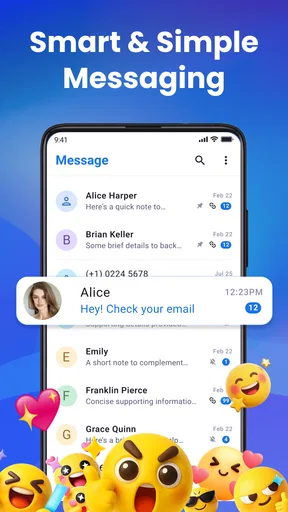
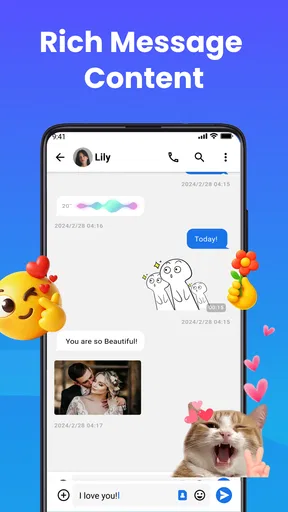
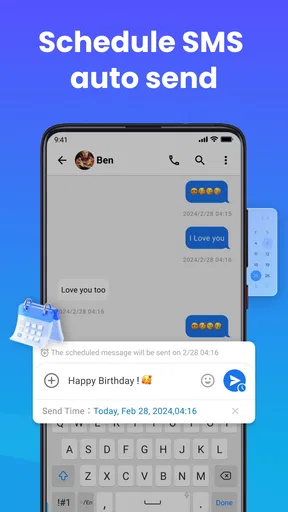
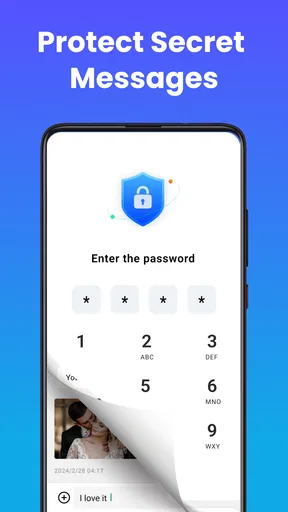
Our Review of Messages: Text SMS Home App
 Analysis by Appyee
I spend a lot of time in messaging apps, so I notice quickly when a text-message tool makes everyday conversations easier or merely adds another layer between me and the keyboard. Messages: Text SMS Home App, from Ant Utilities, takes a focused approach: it is a communication app built around sending SMS, starting conversations quickly, blocking unwanted texts, and adjusting the way the inbox feels. After using it as a practical texting home base, I found it more interesting than its short “Messages” label suggests, although it is not automatically the best replacement for every phone’s built-in messenger.
The appeal is straightforward. Instead of treating SMS as a rarely used system function, the app presents texting as something you can launch and manage directly. That matters if you regularly message family, delivery drivers, schools, local businesses, or contacts who do not use the same internet-based chat service as you. The free entry point makes it easy to try, while optional purchases ranging from $4.99 to $14.99 per item suggest that some customization or convenience features may sit behind upgrades.
How Messages feels in everyday use
When several people share a household phone or help one another keep up with texts, a dedicated SMS app can make routine coordination feel less scattered. I find Messages most useful when it serves one person’s ordinary texting rather than acting as a shared family inbox: conversations and replies belong to the phone’s user, so everyone should be clear about whose messages they are handling.
A practical home for ordinary texting
My first impression is that the app is aimed at speed rather than social discovery. You are not opening it to browse channels, follow communities, or manage a large online profile. You open it because you need to send a text, find an existing conversation, or deal with an unwanted message. That narrow purpose is a strength: the interface concept is easier to understand than a communication app that tries to combine SMS, calls, video, status updates, and social features.
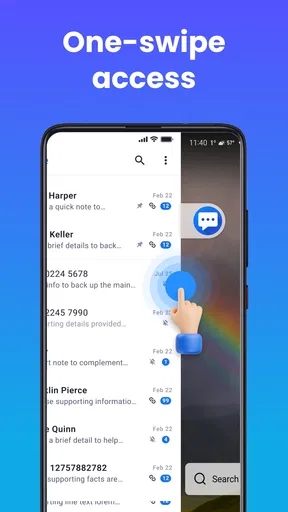
A useful everyday example is a busy morning when I need to send the same kind of short update to several people: a changed pickup time, an arrival message, or a reminder to someone who may not use a data-based messenger. A fast SMS launcher reduces the number of taps between opening the app and reaching the conversation. The benefit is not dramatic in a single exchange, but it becomes noticeable when texting is part of a routine.
The app also makes sense as a secondary communication tool for people who want a clearer separation between regular texting and more feature-heavy chat platforms. SMS remains dependable for reaching contacts with different phones or different app habits. Messages does not try to disguise that basic role with a social feed. I appreciate that restraint.
Spam blocking is useful, but it changes the responsibility of checking messages
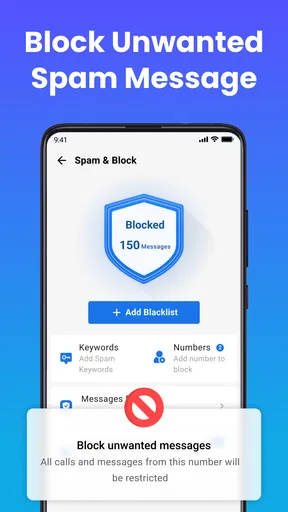
Spam blocking is one of the more meaningful parts of the package. Unwanted texts are not merely annoying; they can bury a legitimate delivery notice, appointment reminder, or security message. Having blocking tools close to the inbox gives the user a chance to manage that problem without installing a separate utility.
My advice is to treat blocking as a filter that deserves occasional review, not as something to switch on and forget. A genuine sender can look unfamiliar, especially when a business uses a short code or an automated number. If you rely on texts for two-factor sign-in or service alerts, check blocked or filtered areas after setting up the app. The convenience of fewer junk messages is only worthwhile if important messages remain easy to recover.
This is also where Messages differs from a minimalist default messenger. A basic system app may be sufficient if your inbox is quiet, but a dedicated spam-control workflow becomes more valuable when promotional texts and unknown senders are a regular problem. On the other hand, users who already have a trusted filtering solution may find this part redundant.
Customization can improve comfort, not just appearance
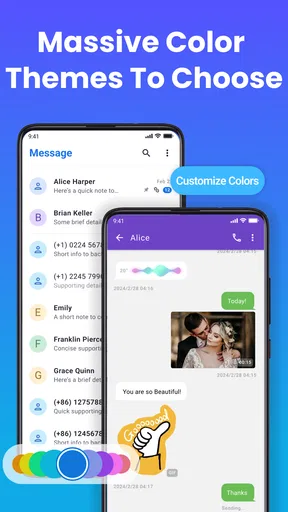
The customization angle is more practical than it first sounds. A messaging screen is something many people check repeatedly throughout the day, so small choices in layout, visual emphasis, or conversation presentation can affect how quickly you find the right thread. I would focus on settings that improve recognition: making active conversations easier to distinguish, reducing visual clutter, and choosing a presentation that remains readable in different lighting.
There is a trade-off here. Customization can make the app feel more personal, but too many adjustments can also create a layout that looks attractive while slowing down routine actions. I recommend changing one setting at a time and then using the app normally for a day. If finding a contact becomes less immediate, the visual improvement is not worth keeping.
That approach is especially helpful for older users or anyone with eyesight concerns. A simpler, more legible arrangement may matter more than decorative themes. Messages is at its best when customization serves navigation rather than becoming a project in itself.
Who will appreciate the launcher approach
I can see this app working well for someone who sends many short SMS messages and wants the messaging function to feel more deliberate than a hidden system shortcut. It is also a reasonable choice for people who receive enough unwanted texts to value a dedicated blocking workflow, or for users who prefer adjusting the appearance of their inbox instead of accepting the phone maker’s default design.
Families managing several kinds of phones may also benefit. If one person uses an internet chat service, another relies on standard texting, and a third changes devices frequently, SMS remains the common denominator. A focused app can make that common channel easier to maintain.
I would be more cautious about recommending it to someone who almost never sends SMS, already likes the phone’s standard Messages app, or depends heavily on encrypted internet messaging. This is not a replacement for every type of chat. It is specifically useful when ordinary texting is important enough that speed, filtering, and presentation justify a separate app.
What the current release tells me about its direction
I’d start by deciding who will use the phone and whether this app is meant to replace its existing texting routine, not assume that installing it creates separate profiles or family controls. That boundary matters most on a shared device: check the phone’s own account and notification setup, then agree on who should read and answer messages before using it to coordinate pickups, appointments, or household errands.
The present version is a mature point to evaluate
The current release is version 2.3.75, and that gives the app a more established feel than a brand-new experiment. I would not interpret the version number as proof that every rough edge has disappeared, but it does indicate that the product has gone beyond a first draft. The core identity is now clear: quick SMS access, inbox management, spam control, and personalization rather than a broad all-in-one communications platform.
The app was released on May 15, 2026, so the most useful way to judge it is by what it does today rather than by assuming that a future update will solve a current annoyance. I like the direction because the feature set is coherent. Each major promise relates to the same task: helping me handle text messages with less friction.
Ant Utilities has also kept the positioning easy to understand. The app is free to start, and it is suitable for Everyone from an age-rating perspective. That makes it approachable for a household where different family members need the same basic texting tool. Optional in-app purchases are available, so I would still check which conveniences are included before deciding whether the free experience is enough for long-term use.
How the release evolution affects existing users
For someone already using an earlier version, the main question is not whether the app has a long feature list. It is whether the current release preserves the fast path to a conversation while making filtering and appearance controls dependable. Existing users should pay attention to whether their preferred layout survives an update and whether blocked-message handling remains easy to understand.
I would also recommend testing the workflows that matter most immediately after updating: starting a new message, replying from an existing thread, locating a recently received text, and recovering something that was filtered. These checks take little time and reveal more than browsing a list of changes. A communication app earns trust through ordinary actions repeated many times.
There is another practical point for established users: customization can create a personal setup that is difficult to recreate if settings change. Before making a major adjustment, note what currently helps you move quickly. That is not a criticism of this particular release; it is sensible housekeeping for any app that lets the inbox look and behave differently from the default.
What feels stronger than the usual alternatives
Compared with the standard messaging app included with a phone, Messages offers a clearer reason to switch: it puts more emphasis on launch speed, spam handling, and personal presentation. A default app usually wins on familiarity and integration. It may already be tied neatly to the phone’s contacts, notifications, and system behavior, so changing apps can feel unnecessary if you have no specific complaint.
Compared with internet-based messengers, the advantage is reach. SMS does not require every participant to install the same service, create an account, or stay inside one platform. The disadvantage is that SMS generally lacks the richer media, group controls, and privacy expectations that people associate with modern chat services. Messages improves the SMS experience; it does not transform SMS into an encrypted social network.
Compared with a dedicated spam utility, the combined approach is convenient. I would rather manage ordinary conversations and questionable senders in one place than jump between tools. The compromise is that a combined app may not offer the depth of a specialist filter or the complete ecosystem of a major internet messenger. Your choice should follow the problem you are trying to solve, not the number of features shown on the screen.
Small workflows that make the app more useful
One workflow I recommend is to use the app as the default starting point for time-sensitive texts, while keeping internet chat for conversations that benefit from richer media. That division prevents me from forcing every contact into one service. I can use SMS for a quick “I’m outside” message or a one-time coordination note, then use another platform when a group needs photos, files, or ongoing discussion.
A second useful habit is to review the inbox after a period of heavy spam rather than deleting everything in a hurry. Automated messages often resemble junk at a glance. Keeping a short mental list of services that legitimately text you makes it easier to distinguish a nuisance from an important alert. The app’s blocking tools are most valuable when paired with that bit of human judgment.
A third is to design the interface around your thumb and your attention. Put less emphasis on decorative changes and more on making frequent actions visually obvious. If you often reply to the same few contacts, a layout that helps those conversations stand out can save more time than a theme that merely changes colors. This is the kind of benefit that will not show up in a store summary but becomes clear after several days of normal use.
Where the experience still has limits
The biggest limitation is the nature of SMS itself. If your friends and colleagues mostly communicate through richer chat platforms, Messages cannot make those conversations appear here simply because it is a better SMS launcher. You may still need several apps, and switching between them can cancel out some of the speed advantage.
There is also a learning cost when moving away from a familiar system messenger. Even a well-organized alternative requires you to learn where its filters, appearance controls, and conversation actions live. That cost is small for an enthusiastic texter, but it may not be justified for someone who sends only a handful of messages each month.
The optional purchases deserve a measured approach as well. The free version makes the app accessible, but users who want the full customization experience should consider the separate item prices before committing to a particular setup. I would begin with the no-cost experience, identify the exact feature that would improve my routine, and only then decide whether an upgrade is worthwhile.
Device compatibility is another practical checkpoint. The app requires Android 8.0 or later, so most current Android phones should be within reach, while older devices may not be. Anyone switching from a very old handset should check the operating-system requirement before planning a move. This is a simple detail, but it can prevent an unnecessary installation attempt.
What to watch as you decide
The app has an average rating of 4.1 from around 233 ratings, with over 50 written reviews, and it has passed 50K installs. Those figures suggest a real but still relatively focused user base rather than universal adoption. I read that as a reason to judge the app against my own texting habits instead of treating its popularity as a guarantee.
For new users, I would watch three things during the first week. First, does opening a conversation feel faster than using the phone’s existing messenger? Second, does spam filtering reduce noise without making legitimate alerts harder to find? Third, do the customization options improve recognition or merely make the screen busier? Clear answers to those questions will tell you whether the app is solving a real problem.
For existing users, I would watch how future releases handle stability around the basics. New visual options are welcome, but they should not come at the expense of predictable notifications, easy conversation recovery, or a clear distinction between normal and blocked messages. The product’s strongest path is continued refinement of its central SMS workflow, not expansion into unrelated communication features.
My recommendation after using it
I recommend Messages: Text SMS Home App to Android users who want a dedicated, more adjustable home for standard texting. Its combination of quick access, spam blocking, and customization gives it a clear purpose, and the free starting point makes experimentation low-risk. I especially like it for people whose SMS inbox is busy enough that the default app feels difficult to manage but who do not want to abandon ordinary texting for an internet-only service.
I would skip it if your phone’s built-in messenger already handles your conversations comfortably, if nearly all your communication happens in encrypted chat services, or if you are unwilling to spend time deciding how filters and visual settings should work. In those situations, the switch may add maintenance without adding enough value.
My overall view is positive but specific: this is not a universal messaging replacement, and it does not need to be. Its best quality is that it takes a familiar, sometimes neglected form of communication and gives it a more intentional workspace. If faster SMS access and better inbox control are genuine needs for you, this app is worth trying. If they are not, the default option will probably remain the simpler choice.
Verdict
Strengths of Messages: Text SMS Home App
- Simple interface makes texting easy for users of all experience levels.
- Supports quick access to contacts and recent conversations.
- Useful customization options for chat appearance and notifications.
- Can help organize SMS threads more efficiently than some stock apps.
- Lightweight design may run smoothly on older Android devices.
Limitations of Messages: Text SMS Home App
- Some features may depend on the device’s default SMS permissions.
- May include ads or promotional elements in the free version.
- Limited usefulness for users who primarily communicate through messaging apps.
- Privacy depends on how the app handles message and contact permissions.
- Compatibility and features can vary across Android manufacturers.
Similar Picks in This Category
View All
Google Messages
Google LLC4.6

Gmail
Google LLC4.1

Google Meet
Google LLC4.4

Google Chrome
Google LLC4.1

WhatsApp Messenger
WhatsApp LLC4.6

Carrier Services
Google LLC4.2
Frequently Asked Questions
What is Messages: Text SMS Home App used for?
Messages: Text SMS Home App is designed to provide a convenient way to manage text messages from one place. It can help you read, send, receive, organize, and search SMS conversations, depending on the features available in your version. Before downloading, check whether it supports your preferred messaging functions, notification settings, contact access, and the default SMS requirements of your Android device.
Does Messages: Text SMS Home App work on iPhone and Android?
Compatibility may depend on the specific version of Messages: Text SMS Home App and the device platform. Apps that manage traditional SMS messages commonly require Android system permissions and may not offer the same functionality on iPhone because iOS restricts access to SMS management. Review the official store listing, supported operating systems, and device requirements before installing to avoid downloading an incompatible version.
Does the app need to be set as the default SMS application?
Some SMS applications work only when selected as the phone’s default messaging app, while others may allow limited access without replacing the existing app. Setting it as default can enable sending, receiving, deleting, and organizing messages from one interface. Before confirming the change, read the permission prompts carefully and make sure you know how to switch back to your previous messaging application if necessary.
What permissions does Messages: Text SMS Home App request?
A messaging application may request access to SMS messages, contacts, phone functions, notifications, and storage or media files. These permissions can be necessary for displaying conversations, identifying senders, sending texts, and attaching images. However, you should review every request before granting access and install the app only from a trusted source. Permissions can usually be managed later through your device’s privacy settings.
Is Messages: Text SMS Home App free, and are there advertisements or in-app purchases?
The basic download may be free, but the actual cost structure can vary by version, region, and platform. Some messaging apps include advertisements, optional premium features, subscriptions, or purchases for customization and an ad-free experience. Check the Google Play Store or App Store listing before downloading, paying particular attention to subscription terms, trial periods, renewal conditions, and the developer’s privacy information.
